Skip to content Skip to footer

Gas Station Automation

ResPOS Oil Hardware and Software Solutions for the Fuel Industry

2,000+ jobs at gas stations across Ukraine

Customers

Market leaders trust us

Advantages

For Businesses

Growth of the corporate client base

Intelligent management of cash and electronic wallets; flexible management of paper and electronic vouchers and records.

Development of the retail sales channel at gas stations

Quick refueling without waiting in line via the mobile app; ordering food at a specific gas station location using the mobile app.

Attracting new customers using a multi-channel system

The ability to attract new customers through affiliate loyalty programs. Creating joint promotions to increase the frequency of online purchases.

Self-service pumps—the new standard in fuel retail

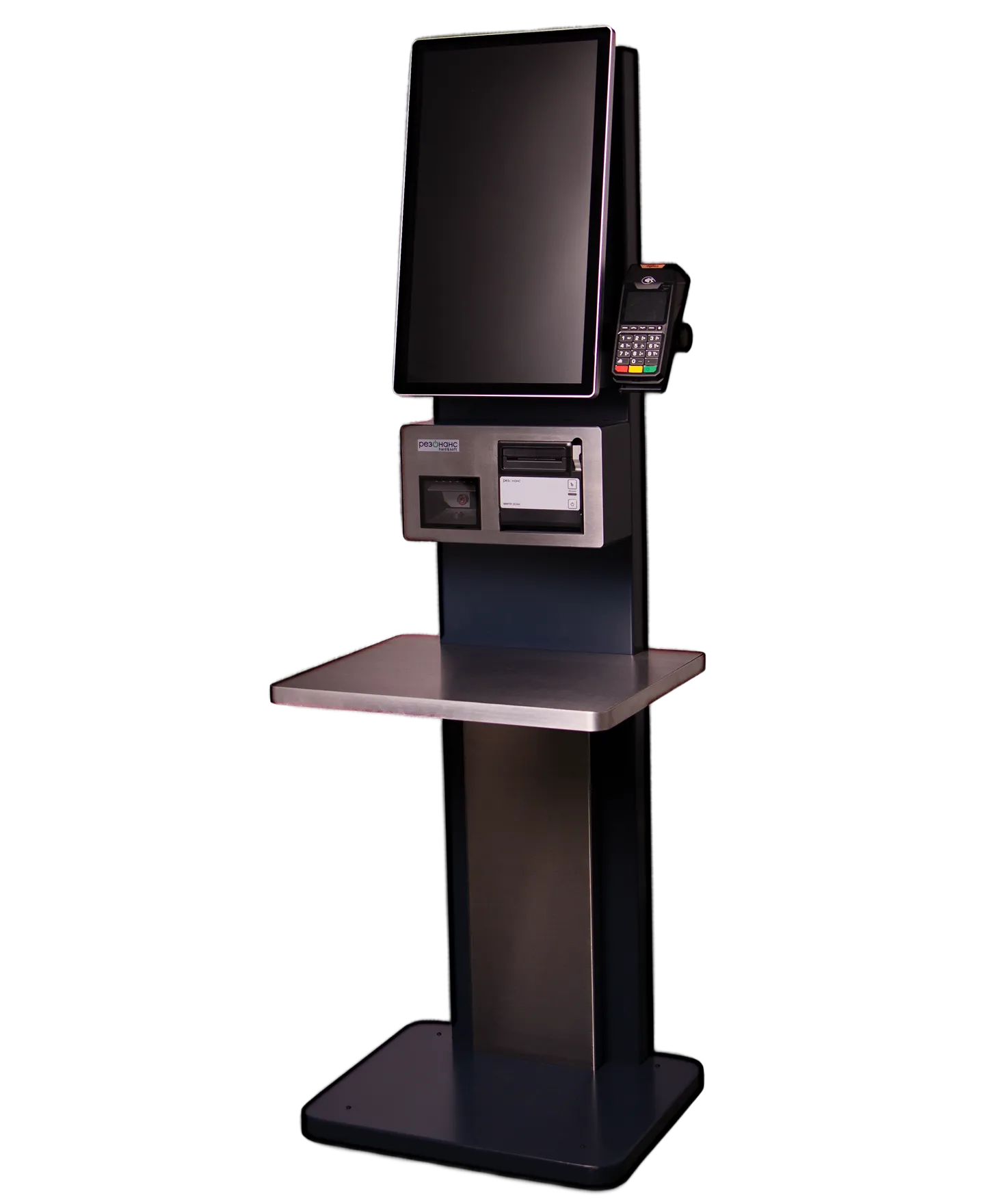
Self-service checkout kiosks for fast in-store customer service. Self-service checkout kiosks for “unmanned” gas stations and CNG stations.

Automated fuel accounting

Tracking fuel receipts, monitoring fuel dispensing via the fuel dispensing system, monitoring fuel levels in tanks, and monitoring fuel losses.

Analytics for Strategic Management

Total network revenue, growth trends, top-performing and underperforming gas stations, plan vs. actual, key risks (losses, margin decline)

On-the-fly network scaling

Easy connection of new gas stations without complicated setup. Standard operating procedures.

Flexibility to meet business needs

Adapting the system to existing business processes.

How ResPOS Oil works at your gas station chain

From a customer at the pump to a report on your screen

Higher revenue
Mobile channel · Cards · Self-service
Full control
All stations · One screen · Real time · 24/7
Corporate clients
fuel cards · wallets · limits · personal account
Automated reporting
fiscal · accounting · management
Your customers
Mobile app
Orders fuel, food, and drinks from a smartphone. Meals are ready upon arrival—no lines or checkout required
order
Fuel processing
Fuel card management · cash and fuel wallets · limits · overdraft · RFID · magnetic stripe
card
Self-checkout
Self-service—no cashier needed. Reduces lines during peak hours. Outdoor and indoor models
payment
Electronic receipt
The customer receives a receipt immediately after payment via SMS, Viber, or the mobile app—paperless
The entire service is paperless and queue-free
Corporate Client Portal — Available 24/7
Set limits · View transactions · Manage cards
Multi-partner promotions · Rewards program · Discounts
замовлення/оплата
Gas station
Fuel pumps
up to 28 PRK · authorization for release
Scheidt & Bachmann · Tokheim · Gilbarco, etc.
Tanks
up to 24 tanks · level gauges
level · temperature · mass · density
Front-office ResPOS Oil
The heart of your gas station is the cashier and operator's workstation
ECC “MARIA”
fiscal register
automatic transmission to the traffic police
Banking terminal
cashless payment
RFID · NFC · chip
Supports the connection of new gas stations without interrupting network operations
Coffee Box Server · ResPOS Qdish · ResPOS Orders · Self-service checkout
Back-office integration · ResPosLoyalty · 1C/BAS without staff involvement
Remote support · SLA · On-site technician visits · 24/7 hotline
Network owner
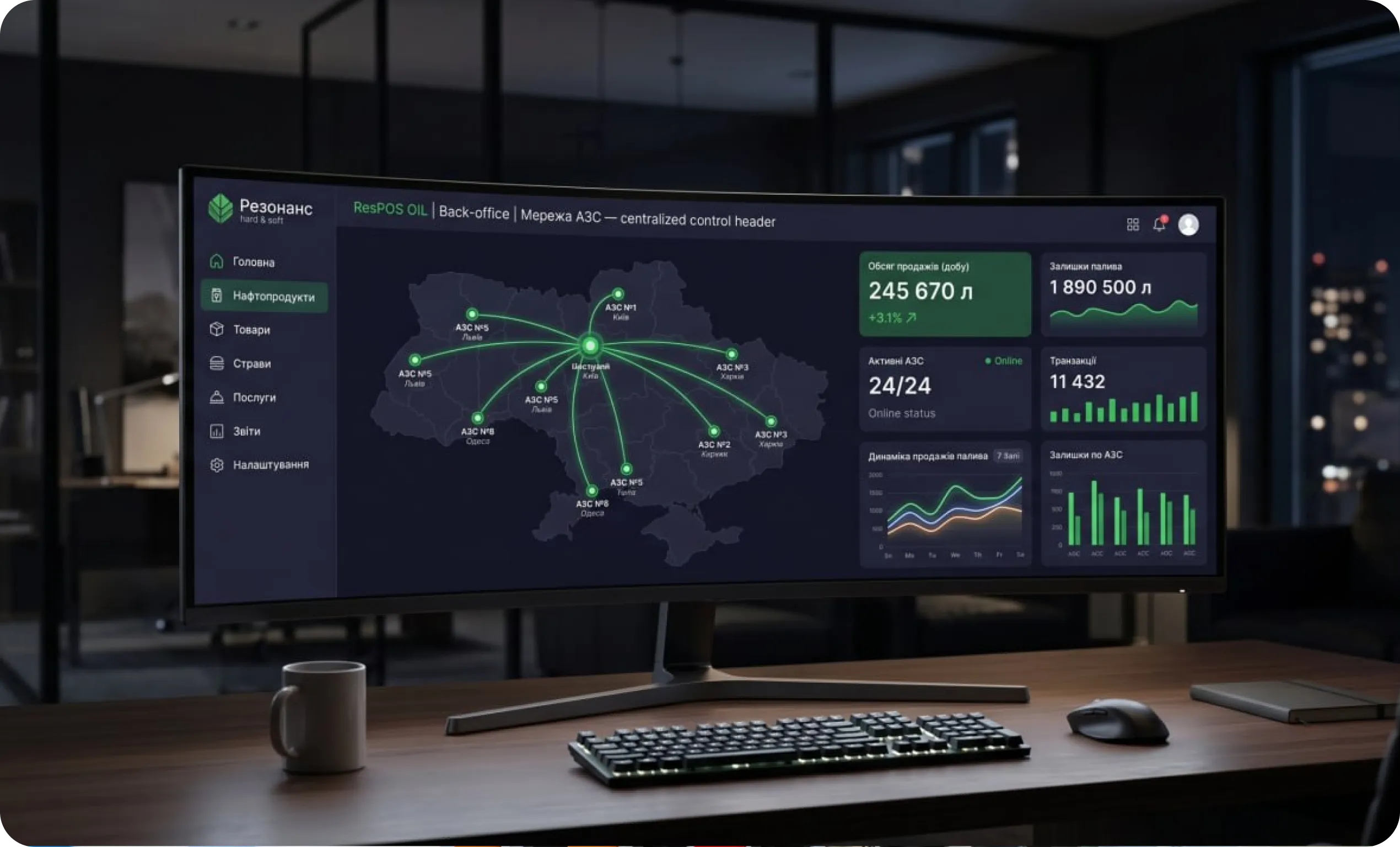
Back-office ResPOS OIL
centralized management of the entire network of gas stations
real time
28
PRK under control
24/7
network monitoring
the size of the gas station network
Financial Analysis
Profit Margin · Accounts Receivable
Budgeting · Plan vs. Actual · Forecasts
accounting
1C / BAS — Accounting
Automatic transmission of all data without human intervention
Excise tax accounting · fuel voucher accounting
All data—no manual entry required
Remote monitoring · 24/7 IT support · On-site technician visits
Audit readiness · Transparent transaction history
дані в реальному часі
ResPOS Loyalty Program
Bonuses · discounts · multi-partner promotions · increasing the average check encourages repeat visits · boosts brand recognition · sales growth
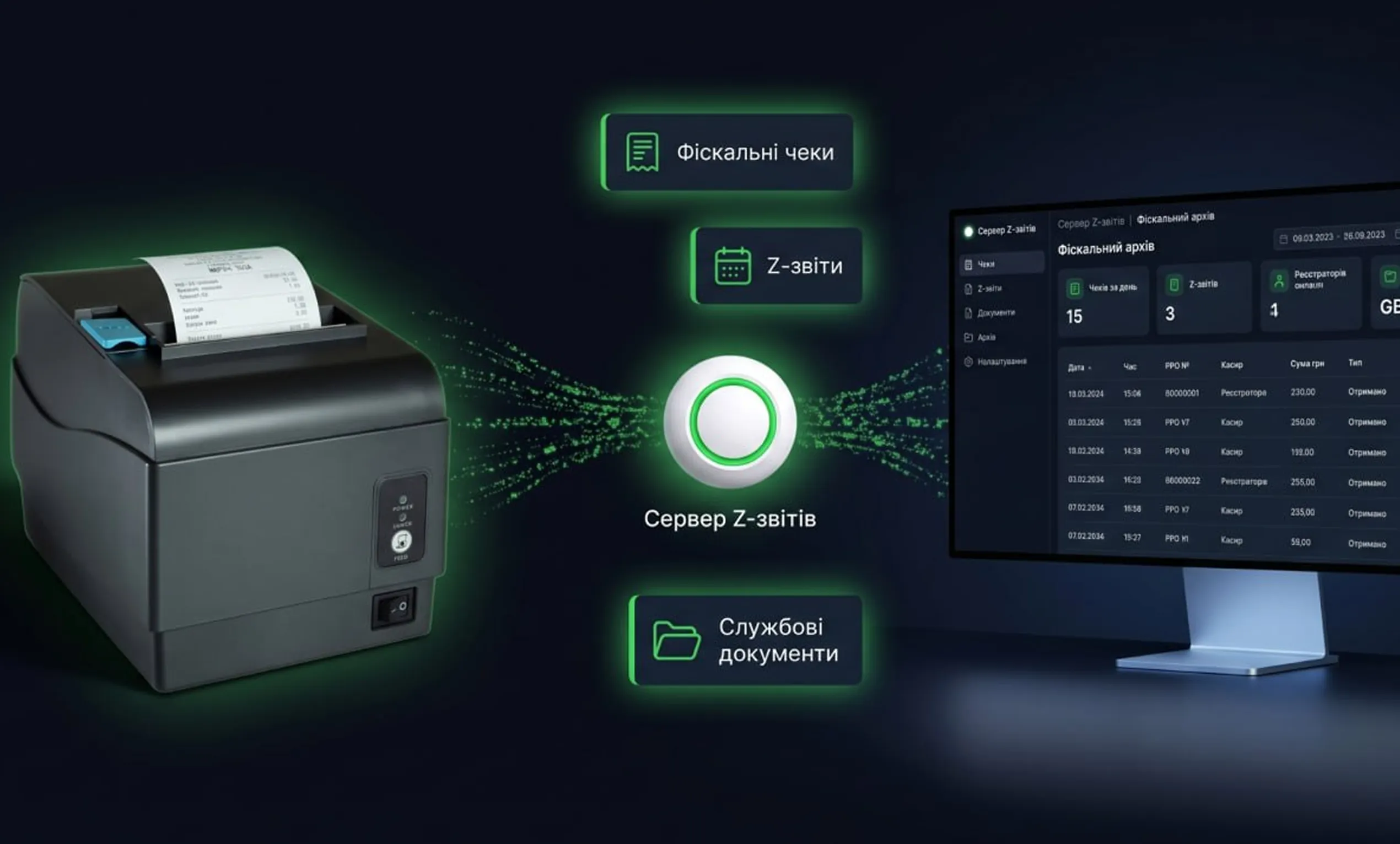
Z-Report Server — Fiscal Archive
Collection of fiscal receipts from the “MARIA” ECR, Z-reports, and internal documents
ResPOS Sender: Electronic receipts for customers via SMS/Viber · REST API for partners
ResPOS Orders — Online Ordering
Mobile app → POS terminal → kitchen → customer
Fuel · Food · Beverages (QR code available at any gas station in the network)

Software Solutions

Front - office ResPOS Oil
Front - office ResPOS Oil

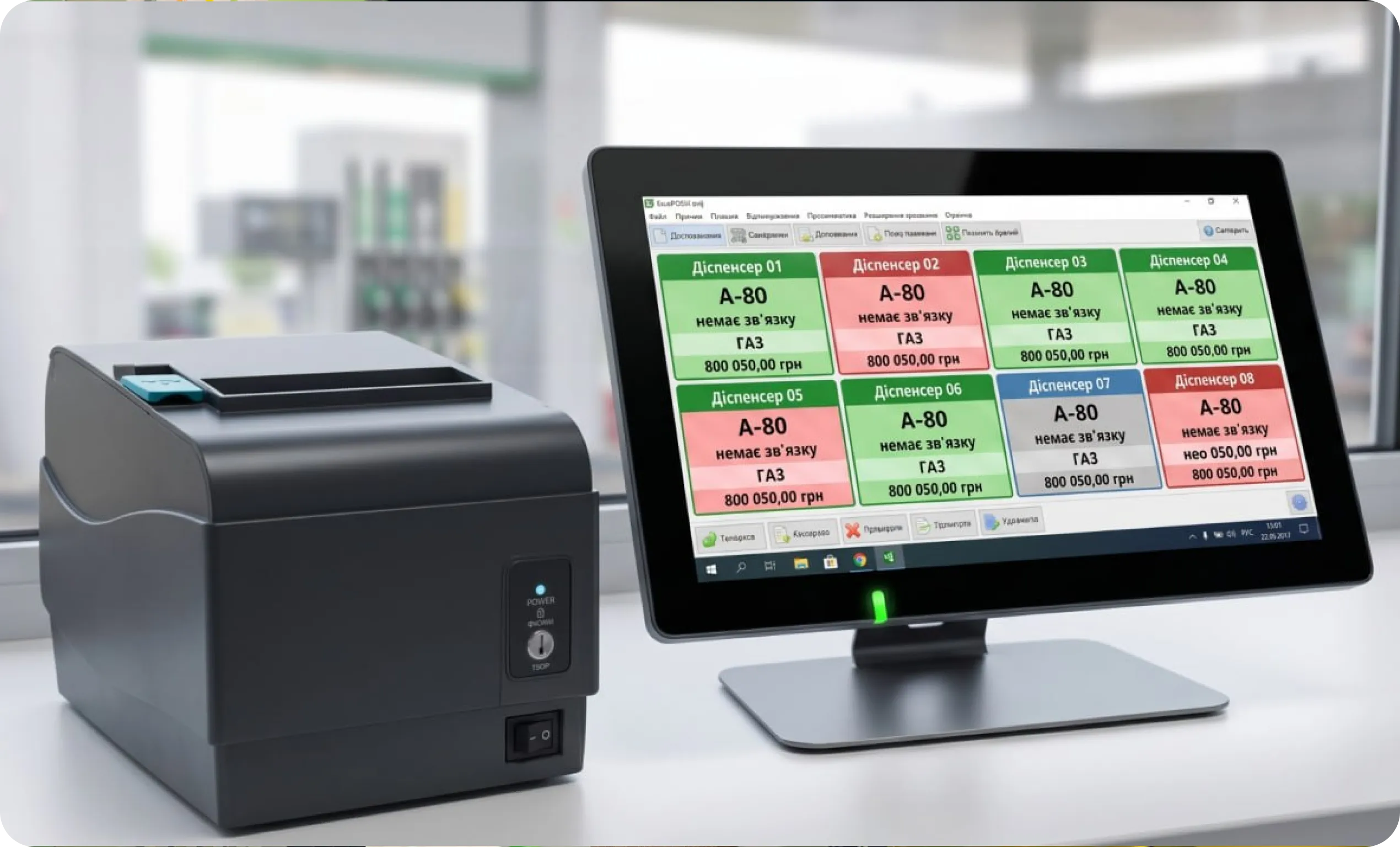
A comprehensive solution for automating processes at gas stations and CNG stations, featuring specialized functionality for creating a variety of services for customers. The ResPOS Oil solution automates operations in the fuel sector, ranging from a single gas station to a network with a large number of gas stations and workstations. ResPOS Oil ensures stable system operation even with a high volume of customers. The system’s functionality allows for simultaneous fuel dispensing, processing sales of related goods and meals, notifying the chef of the need to prepare food, and informing the customer when the order is ready. The ResPOS Oil front office, running in the background, facilitates the dispensing of petroleum products ordered via the mobile app and manages food service at the gas station.
Back-office Конфігурація ResPOS OIL

ResPOS OIL Back-Office Configuration

A comprehensive platform for management and operational accounting across the entire network of gas stations. The system provides centralized control over every workstation and covers all key areas: accounting for petroleum products, merchandise, food, and ancillary services. ResPOS OIL provides a comprehensive set of tools for effective fuel business management: Up-to-date financial overview — aggregated data across the entire network is updated in real time, ensuring the reliability of information for decision-making. Full cash flow control — tracking of all receipts and expenses across any payment method: cash, non-cash payments, fuel cards, and vouchers. Accounts receivable management — monitoring of corporate clients, fuel cards, and payment deferrals in a single environment. Protection against financial losses — automatic detection of discrepancies, under-refueling, staff errors, and suspicious transactions. Profitability analysis — detailed margin analysis broken down by each gas station, fuel type, product group, and customer segment. Accelerated closing of reporting periods — automated preparation of financial statements reduces time and human resource costs. Accurate fuel inventory tracking — automated monitoring of actual inventory levels without manual intervention.
Паливний процесинг ResPosLoyalty

ResPosLoyalty Fuel Processing

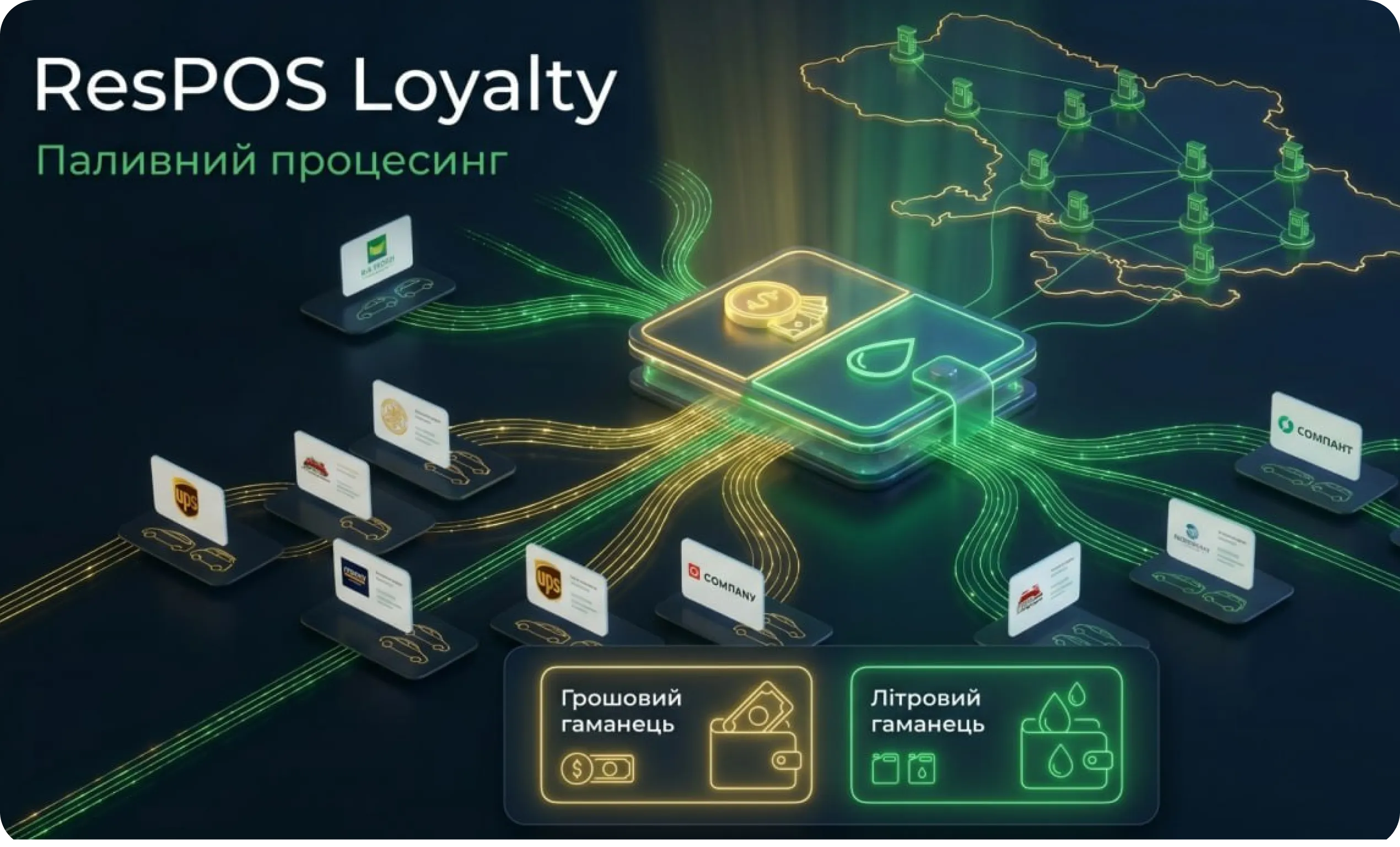
A modern payment system solution for managing the e-wallets of corporate clients at gas station chains, capable of handling a large number of simultaneous transactions. The payment system combines cash and fuel (liter-based) wallets. The “ResPosLoyalty” fuel processing solution helps ensure end-to-end transparency of financial and operational processes, the separation of asset (funds) and liability (fuel) accounting, and the standardization of transactions across the entire network. Cash wallet management: balance tracking, support for a prepaid model, top-up limits, overdraft, usage limits (daily, weekly, monthly), blocking/unblocking, and the ability to dynamically set prices at the time of the transaction. Liter-based wallet management: fuel accounting in liters by product type, recording of contract terms (price, volume, period), overdraft, usage limits (daily, weekly, monthly), blocking/unblocking, number of cards, debits in liters regardless of the current price, monitoring of contract compliance. Fuel cards: RFID cards, magnetic stripe cards, chip cards, or barcode cards. Cardholder verification is ensured by a PIN code; verification is performed via a bank terminal. Fuel card data is stored on the server, preventing forgery and unauthorized access. Personal Account The ResPOS Loyalty software is integrated with the ResPOS OIL front office, 1C and BAS accounting systems, and the user’s personal account
Сервер Онлайн-замовлень ResPOS Orders

ResPOS Orders Online Order Server

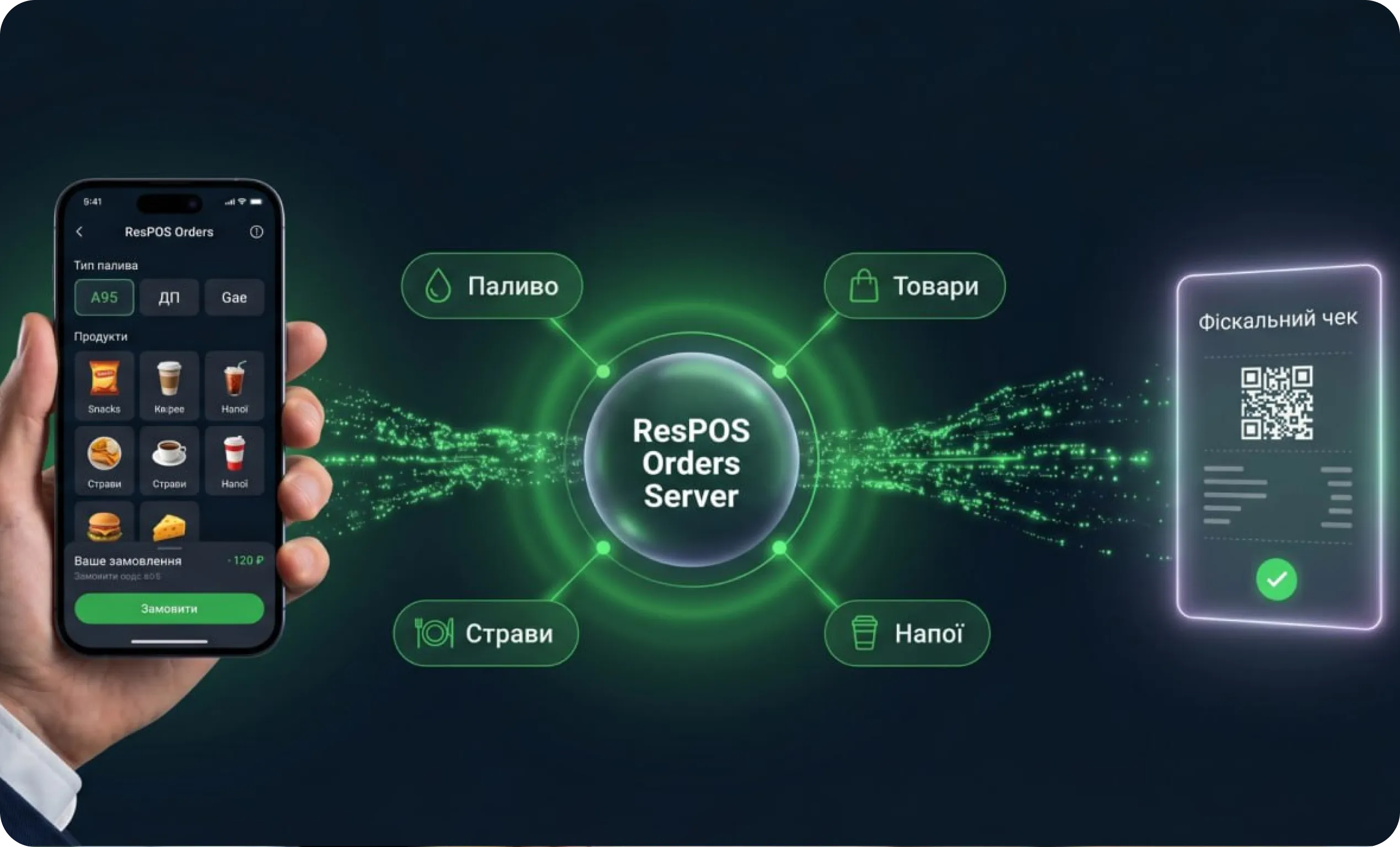
It integrates the mobile sales channel and the gas station’s point-of-sale infrastructure into a single seamless process—from the moment a customer selects and orders fuel, merchandise, food, and beverages on their smartphone, all the way through to receiving an electronic receipt.
“The customer shouldn’t have to think about the infrastructure. They should simply receive what they ordered—quickly and without any extra steps.” The ResPOS Product Team
Features of ResPOS Orders and the network’s mobile app:
Fuel—refueling from a smartphone screen. While at the gas station, the customer selects the type of fuel and confirms the amount in the app. The system sends the order to the appropriate cashier station, records the actual data, and generates a fiscal receipt—without any physical contact with the cash register.
Drinks—location-independent ordering. The customer selects a drink in the mobile app and instantly receives a QR code. It can be used at any gas station in the network—today, tomorrow, or whenever it’s convenient. Lines, cash, and ties to a specific location are a thing of the past.
Food—orders at a specific location. While still on the road, the customer opens the menu of the selected gas station, makes a choice—and the meal is prepared by the time they arrive. No waiting at the register. No “please wait.”
The ResPOS Orders online ordering server is integrated with the ResPOS OIL front office and the customer mobile app.
Програмно-апаратне рішення ResPosQdish

ResPosQdish Software and Hardware Solution
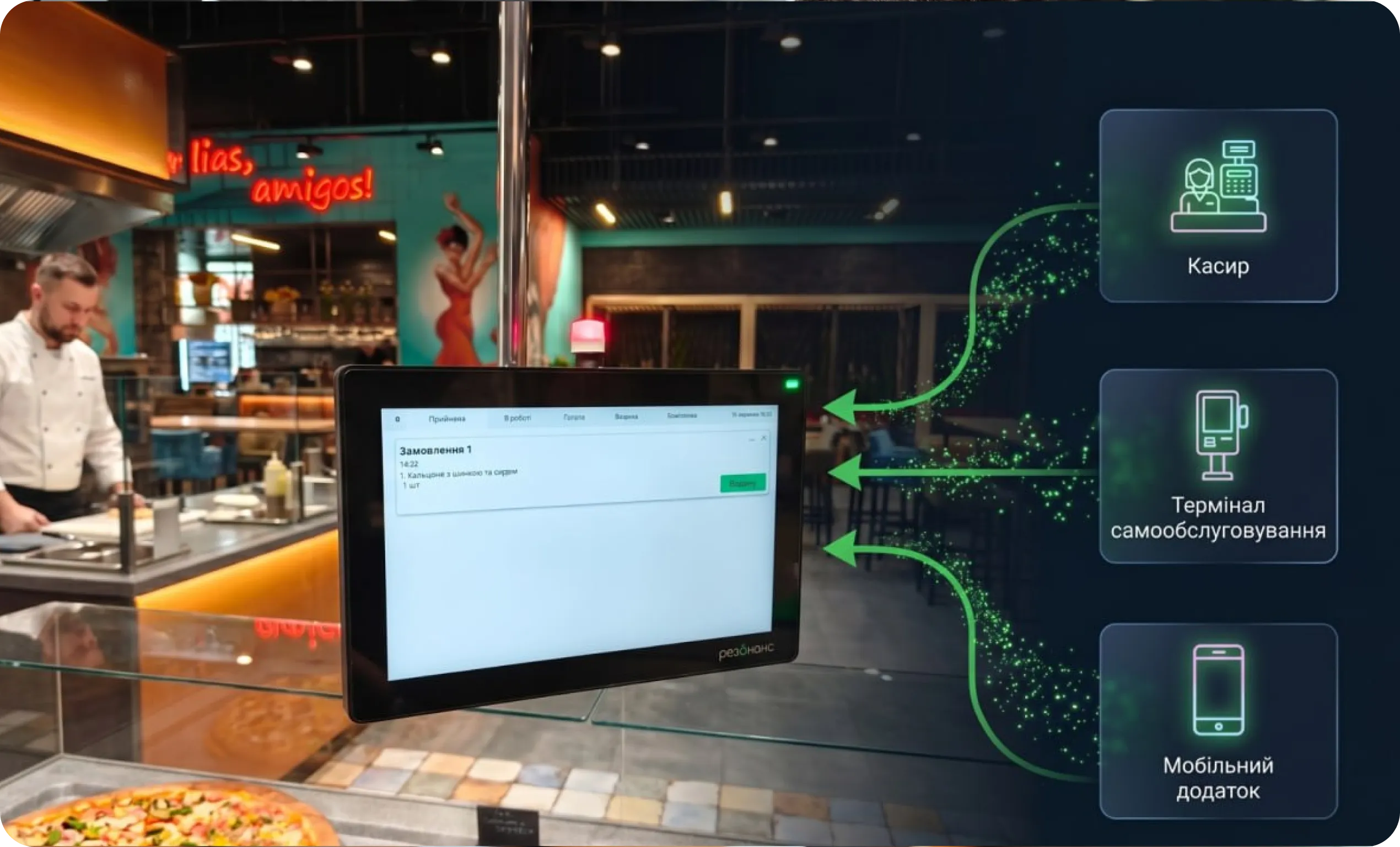
This solution automatically sends orders directly to the gas station kitchen. As soon as a customer places an order—whether through a cashier, a self-service terminal, or a mobile app—the chef instantly receives a notification with a complete list of dishes. No paper receipts. No shouting across the room. No mistakes. The chef receives a notification A new order appears on the screen of a specialized kitchen POS terminal with audio and visual cues, displaying a clear list of dishes, quantities, and priority. The chef manages every stage of preparation. The customer sees everything Every status is displayed on the POS terminal in the dining area—in real time. The guest knows where their order is, without having to ask the staff unnecessary questions. Automatic order transmission eliminates the human factor: forgotten items, mixed-up dishes, and duplicate orders are a thing of the past. ResPosQdish is integrated with cashier workstations running the ResPOS OIL front-office software and self-service kiosks running the ResPOS OIL selfCheckout software.
Сервер «Z-звітів»

“Z-Reports” storage server

This is a reliable software solution for the automated collection, storage, and viewing of electronic fiscal receipts, daily fiscal reports (Z-reports), and service documents from “MARIA” electronic cash registers. The software was developed in full compliance with current Ukrainian legislation regarding cash transactions and the use of cash registers, specifically Law of Ukraine No. 265/95-VR, Resolution of the Cabinet of Ministers No. 199, and Order of the Ministry of Finance No. 1057. The solution provides centralized storage of fiscal receipts in electronic form—each payment document is automatically received from the “MARIA” electronic cash register, stored in a secure database, and remains available for viewing and verification at any time. The solution is designed for businesses that use the “MARIA” ECR and provides centralized control over all fiscal data in real time—from receiving electronic receipts to generating consolidated reports for any selected period.

ResPOS Sender Mailing Server

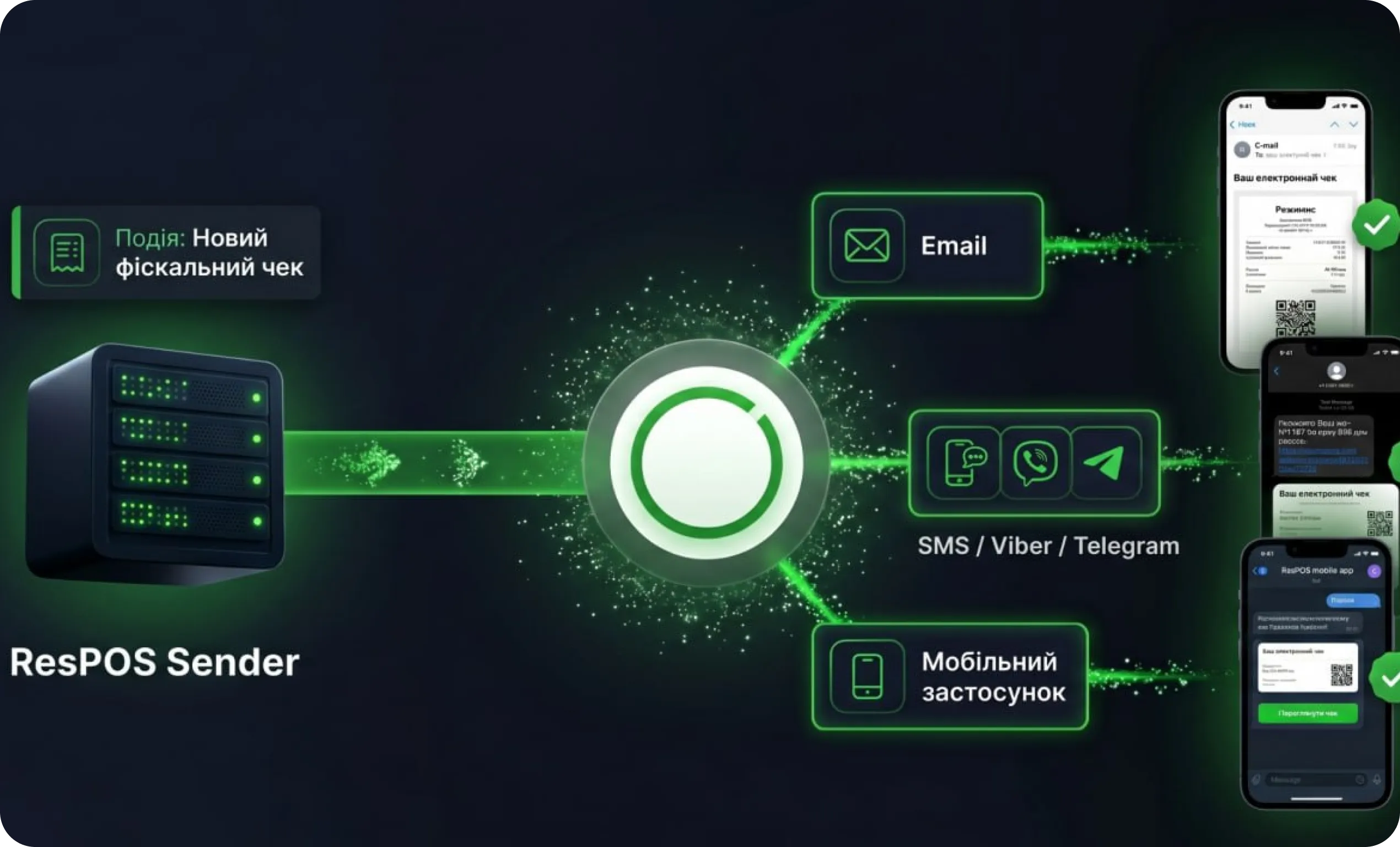
This is a server-based software solution built on an event-driven architecture that provides a full cycle of electronic fiscal receipt management: from receiving fiscal receipts in real time to delivering them to the end user via the selected communication channel. Receipt Delivery. ResPOS Sender supports multiple channels for transmitting fiscal documents to the end consumer. The first is sending a link to the receipt via SMS or Viber: The second is an external REST API: the server provides a programming interface through which a third-party application can request a link to a specific receipt at any time and integrate this functionality into its own software. The result is that the customer receives an electronic receipt almost immediately after the transaction is completed.

Professional POS kits
gas station automation
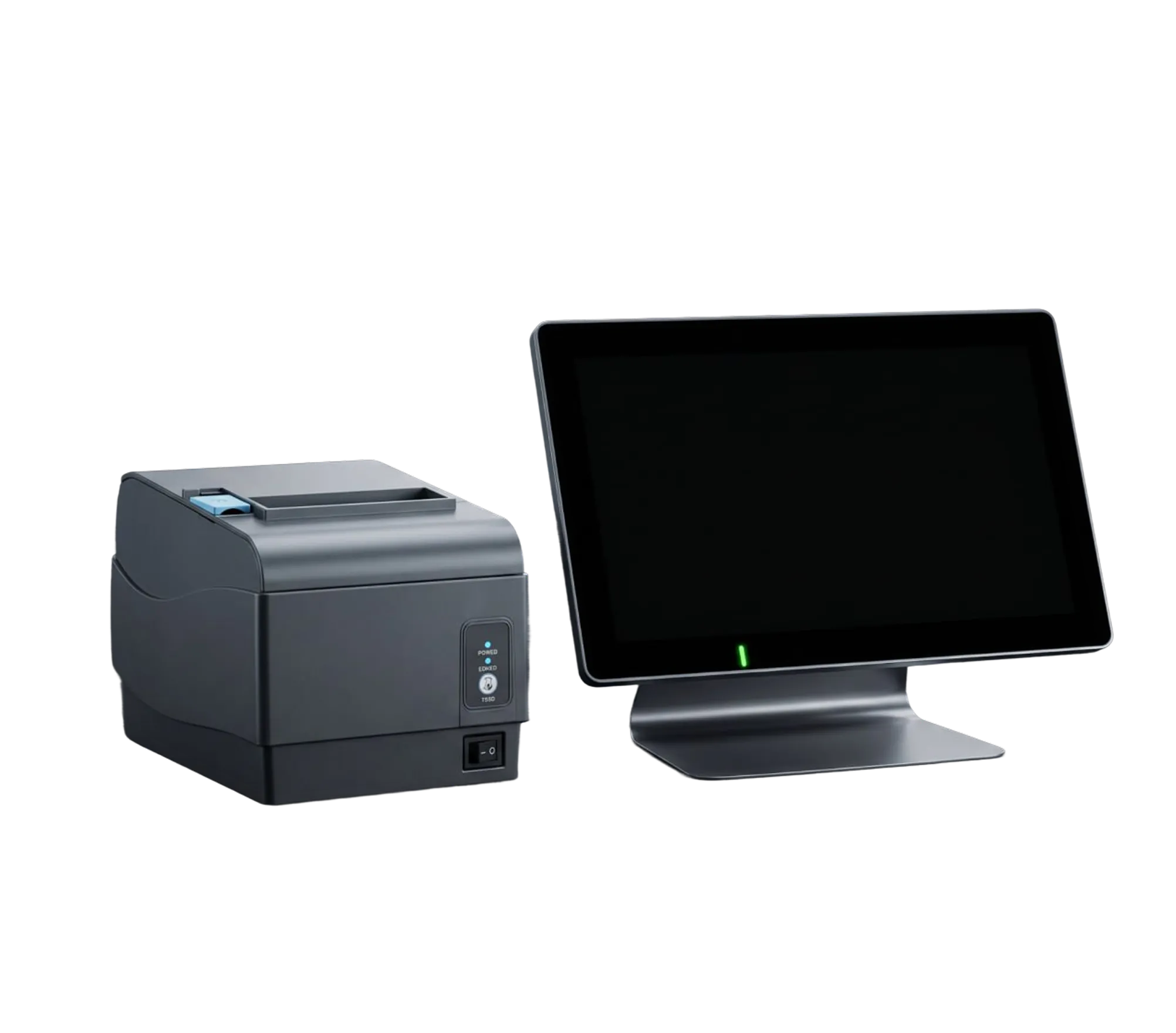
We offer ready-made specialized kits for automating the operations of gas stations and CNG stations. All kits have been tested by our customers and are already operating successfully in real-world conditions.
СЕККА "МАРІЯ - 303А1". Pos-термінал ResPos1466

SECKA “MARIA - 303A1”. ResPos1466 POS terminal

ResPos21AN Self-Service Checkout

Stages of implementation and employee training

1

Preparatory phase

Pre-project analysis: audit of the gas station network’s current business processes, analysis of the company’s IT infrastructure, assessment of automation objectives—from fuel operations to ancillary retail—and evaluation of the budget and implementation timeline.

Solution Design: development of system architecture (servers, network, POS terminals, level gauges, controllers), selection of the optimal software configuration for gas stations, taking into account the specifics of fuel sales and the operation of the station store, integration with existing systems, and a scaling plan for the entire network.
Pilot launch: installation of software solutions, configuration of product, price, warehouse, and fuel catalogs, creation of access roles for staff (operator, cashier, station manager, network administrator), installation of equipment at gas stations, implementation at 1–2 stations in the network, verification of operational stability under 24/7 conditions, and collection of feedback from staff.

Employee training

Training Preparation: organizing training groups based on the structure of the gas station network, developing a training program tailored to specific roles and tasks, and providing video lessons that can be accessed at a convenient time.
Role-based training:
  • Management — sales analytics for fuel and related products, management reporting for the network
  • Accounting — maintaining accounting records for gas station operations, fiscal reporting, fuel accounting
  • Finance Department — managing the network’s finances, revenue control, and station reports
  • Network Administrators — monitoring gas station performance metrics, consolidated reports, and tracking fuel and merchandise inventory
  • IT Department — technical support for stations, hardware and software diagnostics, 24/7 support
  • Cashiers/Gas Station Operators — front-office operations: processing fuel sales, cash register operations, managing loyalty cards
Practical Application: practicing real-life scenarios at a gas station, testing the speed of performing typical operations (fuel dispensing, refunds, shift closing), and testing knowledge of the front-office interface. An individualized approach—the opportunity to ask questions and reinforce practical skills directly at the station.
2
Етапи впровадження та навчання співробітників
3

Confirmation of results

Operational Results: Faster service for drivers and customers at gas stations, shorter lines at the cash register and at the pumps, and real-time synchronization of all stations in the network.
Financial Results: reduced costs resulting from accounting errors related to fuel and related products, fewer write-offs and thefts, precise control of fuel inventory, and optimization of inventory and procurement for station-based stores.
Management Outcomes: centralized control of the entire network of gas stations from a single workstation, transparent analytics on fuel and ancillary retail sales, monitoring of tank levels, and monitoring of staff performance at each station.
IT Outcome: a stable and scalable infrastructure tailored to the 24/7 operation of gas stations, a unified network database, reduced workload on technical support, and rapid integration of new stations into the system.
Business benefits for the network: increased customer loyalty thanks to fast and convenient service, growth in fuel and retail sales, rapid launch of new gas stations within the network, and the business’s readiness to scale up and enter new markets.

Post-launch support

User Technical Support: 24/7 hotline / Service Desk tailored to the gas station’s 24/7 operating schedule, handling of requests in accordance with the SLA with prioritization of critical incidents, remote diagnostics of issues at stations, and real-time assistance for operators and cashiers.
Software Updates and Development: adding new integrations, adapting to changes in tax legislation and fiscalization requirements, and improving fuel accounting and related retail functionality.
Equipment Support: diagnostics and scheduled maintenance of POS equipment, replacement of spare parts, and on-site visits by a technician as needed.
Training and consulting: onboarding of new gas station employees, refresher training for staff following software updates or changes to regulations, up-to-date training materials and instructions tailored to the specific needs of the gas station network.
4
Етапи впровадження та навчання співробітників

Loyalty Program

ResPOS Loyalty Program — Marketing Automation for Gas Station Chains

The ResPOS Oil software and hardware suite is integrated with the ResPOS Loyalty program. Thanks to this unified, integrated solution, a gas station chain can quickly automate its marketing processes—from awarding fuel bonuses to offering personalized deals at the station’s convenience store.

Our official partners and certified service centers ensure the smooth operation of point-of-sale equipment at gas stations throughout Ukraine and provide comprehensive support for the ResPOS Oil software—taking into account the round-the-clock operation of the stations.

Warranties

Service Center and Technical Support

Service network throughout Ukraine

Our official partners and certified service centers ensure the smooth operation of point-of-sale equipment at gas stations throughout Ukraine and provide comprehensive support for the ResPOS Oil software—taking into account the round-the-clock operation of the stations.

24/7 support

A team of specialists is available 24/7—via phone, messaging apps, or online services—to promptly resolve any technical issues that arise at stations across the network. In the event of critical malfunctions, an engineer will go directly to the gas station to quickly troubleshoot the problem and restore the station’s operations.

Remote support

Thanks to the remote monitoring software for gas station operator and cashier workstations, specialists can remotely configure, update, and resolve technical issues at any station in the network—quickly and without the need to visit the site.

Staff Training and Consulting

Training for new gas station operators and cashiers; staff training sessions when software is updated or work processes are changed; instructional materials and guidelines tailored to the specific needs of the gas station network; and video tutorials available at your convenience. If needed, real-time support for station staff.

Official warranty

Resonance Plant LLC provides a warranty for specialized gas station point-of-sale equipment, as well as a warranty and regular software updates for ResPOS Oil—ensuring that all stations in the network operate smoothly around the clock and providing confidence in the system’s reliability for years to come.

Would you like more information?
Call our toll-free hotline, and we’ll help you find the best solution for your gas station or network of gas stations.

Use Cases

ResPOSOil

SEKKA “MARIA-303A1”

A gas station with low traffic

Organize fast customer service and full control over sales—of fuel and related products.

ResPosLoyalty

SEKKA “MARIA-303A1”

ResPOS Oil

“Z-Reports” Storage Server

Gas station chain

Centralized tracking of petroleum products and related goods, and management of fuel cards at all locations within the network

ResPOS Oil

SEKKA “MARIA-303A1”

Gas station

Automation of gas supply, monitoring of billing transactions, and preparation of reporting documents.

Frequently Asked Questions

Our specialists resolve any technical issues, respond promptly to problems, and ensure the smooth operation of hardware and software.
A software and hardware solution that integrates fuel pump management, point-of-sale operations, fuel accounting, station store operations, and network analytics into a single system. Automation eliminates manual errors, speeds up service, and gives management full real-time control over the business.
Yes. ResPOS Oil supports integration with fuel dispensers—the ResPOS Oil hardware and software system supports simultaneous connection of 28 fuel dispensers, whereas most solutions on the market are limited to a smaller number. Integration with tank level sensors allows for real-time tracking of actual fuel levels in tanks, automatic reconciliation of level sensor data with dispensing data from the fuel dispensers, and detection of discrepancies—which significantly reduces the risk of fuel loss and theft.
ResPOS Oil automates the workstations of cashiers and operators at all gas stations in the network, keeping accurate records of fuel sales at each pump and of related merchandise sold at the station’s store. This minimizes human errors in calculations, speeds up service for drivers and customers, and allows network management to monitor finances, fuel inventory, and stock levels in real time.
Analyzing system data by the hour allows you to accurately identify peak traffic at each station and deploy an additional cashier in advance, exactly when needed—without incurring unnecessary staffing costs during off-peak hours. Self-service terminals for fuel payment and kiosks for ancillary products significantly reduce the workload at the main checkout.
Yes. ResPOS Oil supports corporate fuel cards, reward wallets, and proprietary loyalty programs for gas station customers.
Yes. The system is designed to be scalable—new fueling stations can be added quickly without interrupting the operation of existing stations.
The timeline depends on the size of the network and the complexity of the infrastructure. Typically, the average implementation time for 1–2 stations is 2 to 4 weeks, after which the system is rolled out across the entire network according to an agreed-upon plan.

ResPOS Oil: A Modern Solution for the Fuel Industry

An automation system designed for gas station networks

The fuel business doesn't tolerate downtime. Every minute of downtime means a lost customer; every accounting error means real financial losses. ResPOS Oil is designed for those who are building a serious business and understand that a modern gas station network requires a modern management tool.

Why is automation necessary in the fuel industry?

A modern gas station network is a complex operation: dozens of transactions every hour, round-the-clock operations, corporate clients, fuel cards, a convenience store at each station, inventory management, and constant staff supervision. Managing all of this manually means risking errors, losses, and the business’s reputation on a daily basis.

Automation isn't an expense. It's an investment that pays for itself starting from the very first month of operation.

Benefits of ResPOS Oil for the Fuel Industry

ResPOS Oil is more than just software for gas stations. It is a comprehensive platform for managing the fuel business that integrates staff, workflows, and equipment into a single, efficient system. Each tool is designed with the real-world realities of a gas station network in mind: 24/7 operation, high customer traffic, and the need for precise control over every liter of fuel.

Who is ResPOS Oil suitable for?

- You have between 1 and 500+ gas stations
- You need integration with 1C or BAS
- You work with corporate fuel cards
- You need offline operation without an internet connection

ResPOS Oil was developed with the real needs of the fuel retail industry in mind—from small, rapidly growing chains to large operators with hundreds of stations across Ukraine. The system is equally effective for different business models and adapts to each client’s specific goals and scale.

Owner or manager of a gas station chain

You need full control over all stations from a single location—fuel inventory, revenue, staff performance, and financial metrics in real time. ResPOS Oil delivers exactly that: transparency and management without being tied to a specific station.

Scalable Gas Station Operator

You open new stations and realize that manual management can no longer handle the volume. ResPOS Oil lets you quickly connect new locations to a single system—without the hassle or lengthy setup.

A network of gas stations with a convenience store on-site

Your business combines fuel sales with related retail operations. ResPOS Oil automates both areas within a single system—fuel accounting, inventory management, point-of-sale, and the loyalty program all work together seamlessly.

The fuel business with corporate clients

You work with corporate clients who pay using fuel cards. ResPOS Loyalty fully supports fuel card transactions, keeps track of each client’s usage, and generates detailed reports for billing purposes.

How to get a decision

From initial contact to a fully operational network—a simple and transparent process.

We understand that implementing a new system is a major decision. That’s why every stage of our partnership is clearly structured, easy to follow, and backed by support from our experts every step of the way.
Order or get advice on software or

Submit a request to explore the capabilities of the demo unit

Please provide your contact information

    Submit your application

      Key Features

      Transactions involving petroleum products:
      • Flexible operating modes for gas station checkout stations
      • Single-checkout mode at the “Master” gas station
      • Simultaneous operation of multiple checkouts at a gas station: 1 main checkout (Master) and up to 9 slave checkouts
      • An intuitive interface for gas station operators and administrators
      • Real-time monitoring of 28 fuel dispensers in a single interface
      • Display of the operational status of each fuel dispenser
      • Online visualization of fuel dispenser activity
      • Fuel dispenser information panel, displaying: dispenser number, fuel types, programmed nozzles, selected nozzle, set volume, dispensing indication, payment method, information bar.
      • “START” quick-access button
      • “STOP” quick-access button for emergency stop operations
      • Automated fuel dispensing in the following modes: prepaid, actual, “full tank”
      • Automatic printing of the service document “overfill”
      • automatic printing of a fiscal “refund” receipt in case of under-delivery
      • available payment methods: cash, bank card, vouchers, fuel cards (cash or liter wallets)
      • support for payments with fuel vouchers
      • support for a bonus usage and accrual system
      • support for a discount system
      • PIN code confirmation for fuel card transactions
      • fuel price management
      • “Technological spill” transaction
      • ability to issue a combined fiscal receipt for “fuel + goods”
      Tank operations:
      • “PPM Receipt” transaction
      • “Balance Adjustment” transaction
      • “Tank Lock” transaction
      • “Tank Unlock” transaction
      • “Tank Balances” report form (opening balance, received, dispensed, calculated balance)
      Level gauges:
      Protocols: Alisonic Delphi, Gilbarco Veeder-Root TCP/IP, PV4 (OPW SiteSentinel iTouch), PV4 (ND UUS-01), Sens PMP-201, UIP-9602 Display of level gauge readings:
      • Date and time of measurement
      • Total volume by fuel type
      • Level
      • Interphase level
      • Density
      • Temperature
      • Mass
      • Liquid phase mass
      • vapor phase mass
      • fill level
      • vapor phase temperature
      • main product volume
      • accounting balance
      • Level gauge measurement log
      Transactions involving goods and meals:
      • product catalog
      • ability to create new products
      • convenient product search (name, code, barcode)
      • “goods receipt” operation
      • “sale” operation
      • “return” operation
      • “write-off” operation
      • “inventory” operation
      • “Adjustment” operation
      • “Return to supplier” operation
      • Sending a food order to the chef for preparation
      Safety and Control:
      • event logging
      • login/password for system access
      • separate password for “administrative functions”
      • blocking manual price changes
      • blocking balance adjustments
      • gas station configuration
      Additionally:
      • Issuing loyalty cards
      • Displaying fuel card information: wallet type, balance details, limit details, usage details
      • Displaying loyalty card status
      Service features:
      • Hardware configuration
      • Back-office connection configuration
      • Network configuration
      • Other settings

      Key Features

      Gas pumps:
      • Scheidt&Bachmann
      • Adast Systems
      • DresserWayne, Meksan, NuovoPignone
      • OOO TPC “NARA”
      • ZAPPetro
      • «SHELF»
      • «Hako»
      • Nuovo Pignone Nu
      • Novotec GmbH
      • Tokheim
      • «Slavutich»
      • “Terezi”
      • Adast Systems
      • “Omnis-Service”
      • “BBUS”
      • DresserWayne, Meksan
      • NPO LLC “Astron”
      • “Naina”
      • BG Electronik (BENCH)
      • Gilbarco-Salzkotten
      • “XS”
      • NUMERO 10 S.R.L BG Electronik (BENCH)
      • Pump Control SRL
      • DEVELCO Diseños Industriales S.R.L

      Key Features

      The system provides:
      • Detailed sales data for fuel and merchandise—with a full breakdown by payment method: cash, non-cash payments, fuel cards, corporate accounts, and other payment methods.
      • Automated collection of equipment metrics—measurement results from gas station tanks are transmitted to the system without staff intervention, taking into account a temperature range of 15°C.
      • Uses built-in web services for data exchange between the front office (gas station POS) and the back office (1C, BAS), allowing sales results to be viewed online with a stable internet connection
      Management and accounting:
      • Each transaction is recorded in two units of measurement in accordance with Ukrainian law, ensuring legally sound accounting without any extra effort on the part of the team.
      • Structured accounting for each network location The “Project” directory allows you to link the product list to a specific gas station or operator workstation. Each workstation has a unique identifier and a defined operating mode—main, auxiliary, or other—which prevents confusion and ensures a clear delineation of areas of responsibility. Furthermore, for each gas station operator’s workstation, only those payment types relevant to that specific station are configured.
      • Synchronization without delays The configuration of tanks, fuel dispensers, and fuel types forms the basis for continuous online exchange between the front office and back office (1C, BAS). Accounting documents—receipts, transfers, inventory counts, and balance adjustments—are automatically imported into the system along with the shift log, eliminating manual entry and associated errors.
      • Full control over fuel vouchers and records The system provides end-to-end tracking of fuel vouchers: the quantity and value of issued vouchers, the volume of fuel on off-balance-sheet accounts, and the current status at every stage of their life cycle. At the same time, personalized fuel accounting is maintained based on reports—separately for each client.
      • Fuel processing and settlements under unified control Integration with Fuel Processing to
      Reference Guides:
      • Each item in the product catalog and each counterparty has a unique identifier, ensuring precise and unambiguous synchronization with Front-office ResPOS Oil.
      • The fuel and lubricants inventory is classified into a separate category and type—allowing for the tracking of fuel and lubricants while accounting for industry-specific characteristics, without mixing them with other product groups.
      • Fuel storage cells are assigned an additional attribute—the tank identifier. This transforms them into independent accounting objects, enabling the tracking of fuel movement for each tank with maximum accuracy and transparency.
      • Check payment types are expanded with additional fields, allowing a specific payment method to be linked to a particular counterparty or transaction type.
      • The fuel voucher directory contains a comprehensive set of attributes: type, prefix, issuer, and other parameters—all necessary at every stage of a voucher’s life cycle: issuance, sale, and direct use at the gas station.
      Documents. Automation of excise accounting for petroleum products:
      • Automatic generation of excise invoices based on the Ukrainian Classification of Goods for Foreign Economic Activity (UKT ZED). The generation of excise documentation in the system is implemented through specialized processing that automatically collects data from Variable Reports and Retail Sales Reports. When generating documents, payment types, counterparty data, and UKT ZED codes are taken into account.
      • Registration and write-off: All transactions are recorded in the “Batches of Fuel and Lubricants by UKT ZED” ledger. Fuel is written off using the FIFO method, which ensures the accuracy of batch accounting.
      • The system allows for detailed tracking of fuel receipts by UKT ZED codes, which is mandatory for the correct creation of excise invoices.
      • Density calculation: Automatic calculation of the density of received fuel, adjusted to a temperature of 15°C, has been implemented. To ensure system flexibility, the user can manually adjust these values.
      Tracking fuel vouchers:
      • Issuance
      • Receipt
      • Transfer
      • Transfer
      • Sale
      • Return
      • Collection
      • Blocking
      • Write-off
      Interim Report:
      A technical document that records all actions performed at the gas station operator’s workstation during the period between the “start shift” and “end shift” commands: The document header contains the full identification of the point of sale: the name of the gas station operator’s workstation, the current operating mode of the fiscal register, the cash register number, and the serial number of the fiscal device.
      The table section contains:
      • document number,
      • shift number,
      • document date,
      • shift start date,
      • shift end date,
      • initial cash balance at the start of the shift,
      • final cash balance in the cash register,
      • sales amount,
      • returns amount,
      • number of receipts per shift,
      • operator who opened the shift,
      • operator who closed the shift,
      • amount of service deposits,
      • amount of service withdrawals,
      • non-cash sales,
      • non-cash returns.
      All fields in the table section are generated and filled in exclusively within a single work shift.
      The “Advanced” tab contains several sub-tabs, namely:
      • Cash Registers — displays (if available) advance payments broken down by cash register;
      • Service Issuance Transactions — displays transactions for each service issuance or replenishment;
      • Item Removal Log — filled out if such an operation took place;
      • Events — displays all transactions performed during the shift;
      • Working Hours — displays the start and end times of the shift.
      Reports
      • Stock levels in tanks and storage cells
      • Reports 17-NP and 14-GS reflecting the full daily movement of petroleum products.
      • Batches of petroleum products by HS code.
      • Gross profit by payment type
      • Sales and balances of petroleum products and goods
      • Processing
      • Automatic generation of collection documents by type (bank/under the reporting entity.
      • Generation of regulated warehouse accounting documents (goods receipt, transfer, inventory, etc.).
      • Generation of retail tax invoices

      Key Features

      Wallet:
      • Create a new wallet with an initial balance
      • Deposit funds into a wallet;
      • Withdraw funds from a wallet;
      • withdrawing funds;
      • transferring funds between cash wallets/accounts;
      • changing the wallet status (active, blocked);
      • setting limits on cash in the cash wallet (reload limit);
      • overdraft;
      • setting limits on fuel purchases and goods purchases (daily, weekly, monthly);
      One-liter wallet:
      • Creating a new wallet with an initial balance
      • Topping up a liter wallet;
      • Deducting liters (with notes such as gas station, car, etc.); negative balance protection is available ;
      • transferring liters between liter wallets/accounts;
      • linking to fuel types and their categories;
      • changing wallet status (active, blocked);
      • limiting the amount of fuel purchased on a liter wallet (reload limit); overdraft;
      • setting refueling limits (daily, weekly, monthly);
      • entering consumption data for the previous month (when migrating from another system)
      • Entering information on active cards for the previous month (when migrating from another system)
      Account Management:
      Settings:
      • Account type (hryvnia/liter/bonus);
      • Account status (active/blocked);
      • Counterparty;
      • Product range (only for liter accounts);
      • Recharge limit (only for hryvnia/liter accounts);
      • Overdraft (only for hryvnia/liter accounts);
      • opening balance (only for hryvnia/liter accounts);
      • consumption volume for the previous month (only for liter accounts)
      • number of cards in the previous month (only for liter accounts)
      Transactions:
      • Top up cash wallet/account;
      • Top up Litro wallet/account;
      • Transfer funds from Litro wallet to cash wallet/account;
      • Transfer funds between cash wallets/accounts;
      • Transfer between liter wallets/accounts;
      • Withdraw from cash wallet/account;
      • Withdraw from liter wallet/account.
      Fuel cards:
      General Information:
      • Card ID;
      • Wallets on the card;
      • Counterparty;
      • Cardholder;
      • Individual/Legal entity;
      • Card status – indicated by color (black – active, yellow – issued, red – blocked);
      • PIN set – Yes/No
      General card actions:
      • Set or reset the card’s PIN;
      • Assign a cardholder;
      • Assign a card category;
      • View the card’s tenure (in years);
      • view information about changes to the card’s status.
      Security and Control
      • Event logging
      • Username/password for system login
      • card PIN requirement policy
      • Suspicious situations:
      • purchasing two types of fuel with one card in a single day
      • making purchases using two different payment methods with one card in a single day.
      Reporting Forms. Fuel and Lubricants:
      • Fuel and Lubricant Transactions with Grouping;
      • Fuel and Lubricant Sales:
      • Fuel and Lubricant Sales, Fuel and Lubricant Sales with Grouping.
      Wallets/Accounts:
      • funds transfers;
      • deposits;
      • withdrawals;
      • hryvnia accounts/wallets with overdraft
      • wallet limits.
      Legal Entity User Dashboard:
      A technical document that records all actions performed at the gas station operator’s workstation during the period between the “start shift” and “end shift” commands: The document header contains the full identification of the point of sale: the name of the gas station operator’s workstation, the current operating mode of the fiscal register, the cash register number, and the serial number of the fiscal device.
      The table section contains:
      • document number,
      • shift number,
      • document date,
      • shift start date,
      • shift end date,
      • initial cash balance at the start of the shift,
      • final cash balance in the cash register,
      • sales amount,
      • returns amount,
      • number of receipts per shift,
      • operator who opened the shift,
      • operator who closed the shift,
      • amount of service deposits,
      • amount of service withdrawals,
      • non-cash sales,
      • non-cash returns.
      All fields in the table section are generated and filled in exclusively within a single work shift.
      The “Advanced” tab contains several sub-tabs, namely:
      • Cash Registers — displays (if available) advance payments broken down by cash register;
      • Service Issuance Transactions — displays transactions for each service issuance or replenishment;
      • Item Removal Log — filled out if such an operation took place;
      • Events — displays all transactions performed during the shift;
      • Working Hours — displays the start and end times of the shift.
      Reports
      • Stock levels in tanks and storage cells
      • Reports 17-NP and 14-GS reflecting the full daily movement of petroleum products.
      • Batches of petroleum products by HS code.
      • Gross profit by payment type
      • Sales and balances of petroleum products and goods
      • Processing
      • Automatic generation of collection documents by type (bank/under the reporting entity.
      • Generation of regulated warehouse accounting documents (goods receipt, transfer, inventory, etc.).
      • Generation of retail tax invoices.

      Key Features

      The system provides:
      • Connection to the POS terminal. The server establishes a secure connection with the corresponding ResPOS Oil front-office terminal and retrieves current prices for fuel, goods, and services
      • Order acceptance via the mobile app. The customer places an order. The server aggregates the request and determines which POS terminal to route it to.
      • Transfer to the cash register. Order details are sent to the cashier’s specific workstation. In the background, fuel is dispensed and information is sent to the chef’s workstation for meal preparation. The gas station operator sees all necessary data to quickly respond to trigger situations.
      • Status synchronization and fiscal result. The POS system updates the execution status. Upon completion, the server receives the actual volume, amount, and fiscal transaction number.
      • Transfer of results to the mobile app. The server sends an electronic fiscal receipt for the purchased fuel, goods, and services. A QR code is generated to validate the dispensing of a beverage by the coffee machine.

      Key Features

      The system provides:
      • New order: Order accepted, awaiting preparation. Audio and visual cues
      • In progress: The chef has started cooking
      • Ready: Dishes are ready to be served
      • Served: Order delivered to the guest

      Key Features

      Data collection and processing:
      • Receiving data from the “MARIA” ECR via the TCP/IP protocol with an electronic digital signature and session key encryption
      • Simultaneous processing of connections from multiple ECRs
      • Collection of electronic fiscal receipts, Z-reports, service documents, and technical logs
      Review and monitoring:
      • View information about all connected ECRs and the amount of fiscal data transmitted
      • View the date of the last data transmission to the State Tax Service server
      • View Z-reports by month with details for each report
      • View fiscal receipts in electronic form by day of the month with detailed content for each document
      • View service documents and technical logs
      Search and reporting:
      • Search for documents by ECCR serial number, period, and document type
      • Generate summary reports for a selected period and range of Z-reports
      • Export data to external accounting systems
      API for working with fiscal receipts (Receipt):
      • Converting electronic copies of receipts into HTML documents
      • Retrieving a fiscal receipt by internal ID
      • Searching for the next fiscal receipt in the server database
      • Retrieving the current server status with an identifier for use in requests
      • Subscribing to notifications about new receipts on the server
      Administration:
      • Log in using the operator’s username and password
      • Manage user permissions and accounts

      Key Features

      The system provides:
      • Providing information to third-party systems. An open API allows external applications to retrieve receipt data and links to them, ensuring the solution’s horizontal scalability.
      • Data storage. All received receipts are stored in the server database for a preconfigured retention period. This ensures the persistence of fiscal records, the ability to access the document again, and support for retroactive mailing scenarios.
      Administrative Web Interface:
      • ResPOS Sender features a fully functional web interface for operational management of the system without the need for direct access to the server infrastructure. The admin panel covers the full range of monitoring and configuration tasks:
      • Mailing configuration. The administrator configures sending parameters: selection of active delivery channels, binding of SMS and Viber gateways, message templates, and technical connection parameters with providers.
      • Delivery monitoring and management. The interface displays the current status of each message in real time. If a delivery error is detected—gateway failure, number unreachable, connection timeout—the administrator can manually initiate a resend for either a single receipt or a batch resend for a specific group of records.
      • Receipt registry with multi-dimensional filtering. The system provides a structured view of all processed fiscal documents with the ability to filter by delivery status, transaction date, customer ID, and advanced technical attributes—simplifying incident diagnosis and transaction verification.
      • Basic analytics. The built-in dashboard displays aggregated statistics: the total number of processed receipts, distribution by delivery channel, the percentage of successful deliveries, and trends over a selected time period.
      Cashier workstation:
      • Convenient, intuitive interface
      • Convenient and easy product search;
      • Issuing sales receipts,
      • Issuing return receipts with return uniqueness verification;
      • Pending receipts (unlimited number);
      • automatic weight reading;
      • ability to process pre-orders with advance payment;
      • various payment methods: cash, non-cash, mixed, payment with bonuses/points, gift certificates;
      • notifying cashiers of price adjustments;
      • printing price tags according to a specified template;
      • cash register reconciliation with banknote entry;
      • automatic shift closing
      Warehouse operations:
      • inventory of goods (option to process without interrupting sales);
      • partial inventory with data accuracy checks;
      • goods receipt (internal, external);
      • goods receipt based on a generated transfer;
      • goods returns;
      • goods transfers (viewing unconfirmed transfers);
      • orders (internal, external);
      • order templator;
      • kitting (creation of semi-finished products according to process charts);
      • dekitting (breaking down a carcass into its components);
      • expiration date report (list of products with upcoming expiration dates);
      • write-off of goods