
Trade Automation
ResPOS Market POS System for Retail Stores and Chains
- Fast and efficient scaling of retail chains of various formats
- A centralized management platform with a single server for real-time data synchronization
- Advanced online reporting and analytics to support management decision-making
- Standalone operation of hardware-software systems in the absence of a connection
- A reliable IT infrastructure with support and remote maintenance for rapid response to critical situations
Clients
We have earned the trust of retail leaders—automating stores across Ukraine

































Advantages for business
Business Automation with the ResPOS Market Hardware and Software Solution
Complete business transparency
Inventory, sales, finance, and HR—all in one system, in real time
Understanding actual profit
Profit margins for products, stores, and the entire chain—without manual reports
Dynamic network scaling
Easily connect new registers and stores without complicated setup. Standard operating procedures
Flexibility to meet business needs
Adapting the system to existing business processes
Store operational stability
Online and Offline Modes. Offline operation of cash registers when there is no connection
Rapid staff training
Minimal cashier tasks that require no lengthy training or instructions
Efficient cashier operations
User-friendly interface, fast checkout
Centralized sales management
Transparent real-time statistics on cash registers, shifts, and employees
Reducing errors and losses
Monitoring of cash transactions, tracking of goods, employee access rights
Software Solutions for Retail Stores — Accounting, Management, Automation
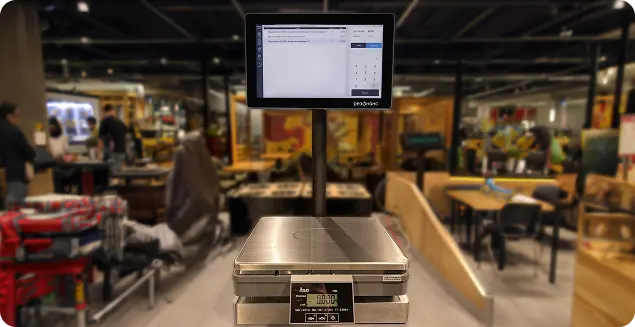
Front-office ResPOS Market — Retail Management Software
Modern software for convenient and fast customer service. This solution is designed to automate retail operations, from a single store to a chain with numerous retail locations and workstations. It includes built-in monitoring software for quick interaction with checkout stations.
ResPOS Market ensures stable system operation even with a high volume of customers.
The system’s functionality allows you to manage discounts, bonuses, and promotions, conduct inventory counts, monitor expiration dates, and prevent overstocking. The program is adapted and synchronized with POS hardware: POS terminals, interactive and multimedia displays, fiscal printers, receipt printers, barcode (QR code) scanners, scales, bank terminals, and other devices.
ResPOS Market software is integrated with 1C, BAS, and ResPosMicro accounting systems and features a synchronization gateway to any accounting system.
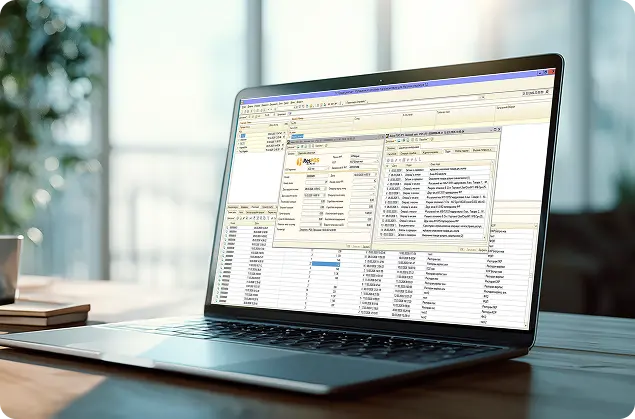
ResPOS Market Back-Office — Inventory Management and Management Accounting System
An accounting and management system for retail and wholesale businesses. The system integrates analytics, accounting, finance, and process management into a single platform, helping owners and managers make accurate and timely decisions.
ResPOS Market configuration—a unified back-office with management and operational accounting for the entire network, control of each workstation, and centralized management of product assortment and pricing.
The system’s functionality enables real-time inventory tracking, centralized price management, procurement control and planning, financial oversight of cash transactions and supplier settlements, transparency of revenue and expenses, employee activity monitoring, and advanced analytics and reporting.
The ResPOS Market configuration is integrated with the ResPOS Market front office via seamless data exchange with automatic data transfer without the need for manual intervention.
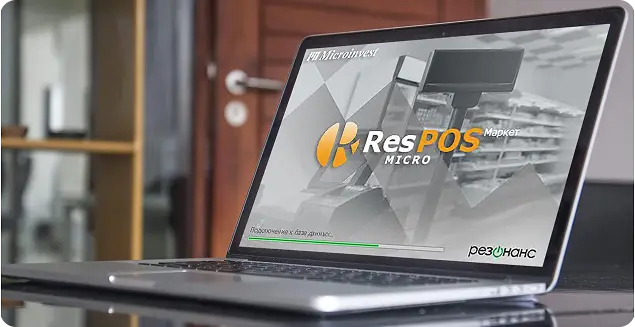
ResPOS Micro — inventory management software for small stores
A simple and flexible accounting system for “neighborhood stores” and small retail and wholesale chains. The system provides an accurate picture of profits, expenses, sales, and inventory levels.
The system’s functionality allows you to work with a single product catalog, track sales and inventory, manage pricing, plan purchases, settle accounts with suppliers, create production process flowcharts, monitor revenue by each retail location, and generate analytics and reports.
ResPOS Micro is integrated with the ResPOS Market front office via seamless data exchange with automatic data transfer without the need for manual intervention.
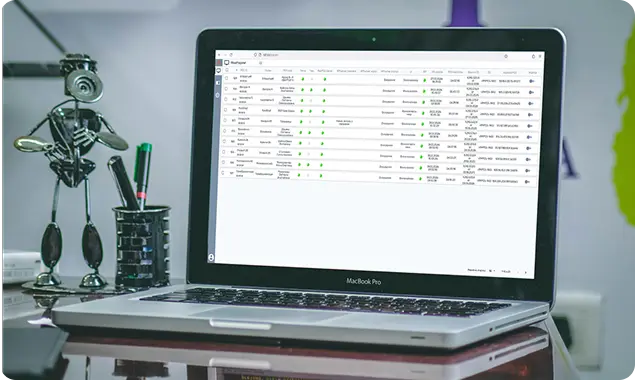
ResPOS WebMonitor — Equipment Monitoring for Retail Automation
Remote monitoring software for cashier workstations. This solution is designed for IT department staff as a support system for configuring cashier workstations, troubleshooting technical issues, diagnosing and resolving malfunctions, and restoring system functionality.
The system’s functionality allows for remote configuration and modification of settings, as well as real-time access to information about the current status of cashier workstations and details regarding any issues.
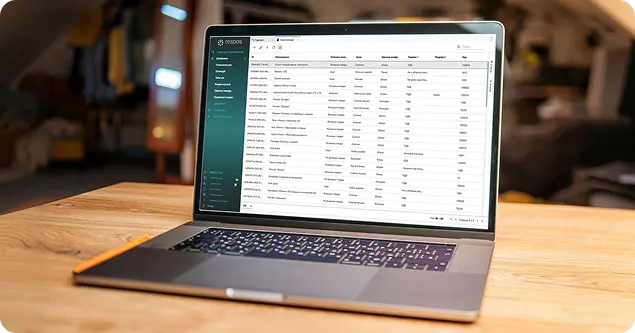
ResPOS API, Synchronization Gateway
Software for synchronizing data between any back-office accounting system and the ResPOS Market front-office.
The synchronization gateway ensures continuous real-time data exchange, synchronizing sales, inventory levels, prices, and reference data. It regulates the operations of each cashier workstation.
The gateway’s functionality allows you to organize the company structure, cashier workstation structure, product catalog management, pricing, system users, access rights, transactions, and reporting.
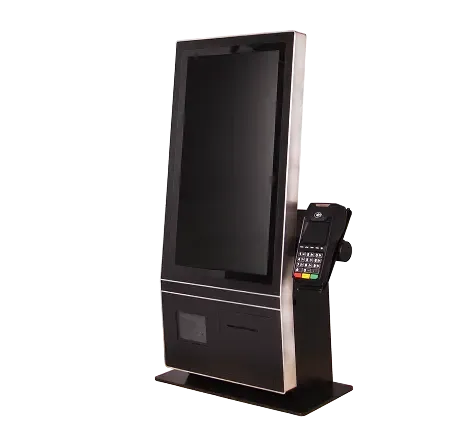
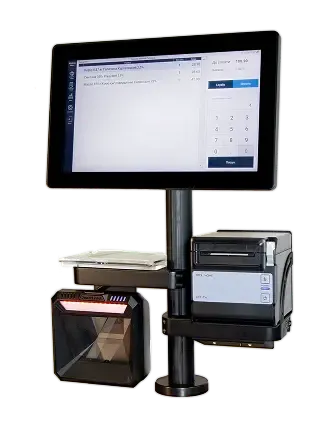
Retail automation equipment — ResPOS ardware and software systems
RESONANCE offers specialized solutions for retail automation in stores of various sizes—from small shops to large supermarket chains. All POS systems come pre-installed with ResPOS Market retail software.
They have been operating effectively in real-world conditions for over 10 years.
Stages of implementing comprehensive automation and staff training

Preparatory phase
- Pre-project analysis: audit of current business processes, analysis of the company’s IT infrastructure, assessment of network automation objectives, and evaluation of budget and timelines.
- Solution design: system architecture (servers, network, hardware), selection of the optimal software configuration for stores, integration with existing systems, and a scaling plan.
- Pilot launch: installation of software solutions, configuration of product, price, and warehouse catalogs, creation of staff access roles, installation of equipment in the store, implementation in 1–2 stores, verification of operational stability, collection of feedback.
Employee training
- Defining training groups, developing role-based training programs, and providing video lessons.
- Management – analytics and administration, Accounting – bookkeeping and reporting, Finance Department – financial management and reporting, Network Administrators – reporting and monitoring, IT Department – support and diagnostics, Cashiers – front-office operations
- Practical testing: real-world work scenarios, speed tests for performing operations, and a test of front-office interface knowledge. Individualized approach—the opportunity to ask questions and reinforce practical skills.
2


3
Verification of results
- Operational results: faster customer service, reduced queues and downtime, and synchronized operations across all stores.
- Financial results: reduced costs from accounting errors, fewer write-offs and thefts, and optimized inventory and procurement.
- Management results: centralized network control, transparent sales and inventory analytics, staff performance monitoring.
- IT results: stable and scalable infrastructure, unified network database, reduced technical support workload, rapid onboarding of new stores.
- Business impact for the network: increased customer loyalty, revenue growth, rapid launch of new retail locations, readiness for business scaling.
Post-launch support
- User technical support: hotline/Service Desk, handling requests in accordance with SLAs, remote problem diagnosis, real-time assistance for staff
- Software updates and development: adding new integrations, adapting to changes in legislation, improving functionality.
- Hardware support: hardware diagnostics, maintenance, replacement of spare parts, firmware updates.
- Training and consulting: training for new employees, refresher training for staff, instructional materials and guidelines.

ResPOS Loyalty Program — Automation of Marketing Business Processes
The ResPOS Market software and hardware suite is integrated with the ResPOS Loyalty program. Thanks to this integrated solution, you can quickly automate your chain’s marketing efforts. Creating your own unique customer loyalty program will boost your chain’s brand recognition, accelerate sales growth, and increase the average transaction value.
Flexible settings for retail locations and chains
Discounts, coupons
Bonuses, cashback
Personalized offers
Joint promotions with other companies
Virtual, plastic cards

Guarantees
Service Center and Technical Support for POS Systems
Network of service centers
A network of official partners and service centers throughout Ukraine ensures the maintenance and repair of hardware and software systems and POS terminals.
24/7 Support
Customer inquiries are handled by phone, via Viber or Telegram, or through online services. If necessary, a specialist will promptly visit the retail location to resolve any issues.
Remote assistance
Thanks to the remote monitoring software for cashier workstations, specialists can perform remote configuration and resolve technical issues as they arise.
Training and Support
Training and consulting, onboarding of new employees, staff training sessions, instructional materials and guidelines, video tutorials. Real-time support for staff as needed.
Call our toll-free hotline, and we’ll find the perfect solution for your business.
Store automation case studies — from small shops to supermarket chains
ResPOS Micro Market
MARIA-304T
Grocery store
Sales automation, tracking product expiration dates, and inventory management.
ResPOS Market
MARIA-304T
Supermarket
Comprehensive automation of sales and inventory tracking, management of multiple retail locations, centralized management, and sales analytics.
ResPOS 1C Enterprise 8.2 Market
MARIA-304T
Retail chains
Automation of all business processes across the retail chain, including inventory management, procurement planning, and online data synchronization.
FAQ About Trade Automation and Inventory Management
Our specialists resolve any technical issues, respond promptly to problems, and ensure the smooth operation of hardware and software.
Will the program help reduce errors in inventory tracking?
ResPOS Market automates all point-of-sale and inventory operations, minimizing human error and enabling accurate, real-time tracking of inventory turnover.
What should you do if your staff makes mistakes during a stock take?
The system includes inventory management features that utilize barcode scanning and automatic weight detection, helping to quickly calculate stock levels, avoid errors, and significantly streamline staff work.
Is it possible to monitor the expiration dates of products in a store?
ResPOS Market provides a report on products nearing their expiration date, allowing you to quickly address any issues with these items. This helps minimize losses and maintain product quality.
How can I track sales and inventory across all retail locations?
The system synchronizes data in real time and generates sales and inventory analytics for each retail location. Managers receive up-to-date metrics and make more informed decisions for the store network.
How should we organize the workstations for store staff?
The software provides dedicated workstations for cashiers, merchandisers, and butchers/trimmers, clearly separating their roles. This speeds up inventory management, reduces errors, and simplifies staff workflows.
What should you do if you need to manage a chain of stores?
ResPOS 1C Market provides centralized store management, data synchronization, and control over inventory and sales. Managers receive comprehensive analytics for all retail locations.
How can we quickly train staff to use the system?
The program is intuitive, and training is conducted on-site or online. The personalized approach allows users to quickly master all features, including inventory and warehouse management.
ResPOS Market — software for store automation and retail management
Retail automation is becoming a necessity for any store today—from small retail outlets to large supermarkets. Competition is fierce, shoppers are becoming more demanding, and it is crucial for owners and managers to quickly monitor sales, inventory, and store operations. ResPOS Market is modern retail software that enables accurate tracking of sales, streamlines staff management, and optimizes business processes.
Why is trade automation important for retail?
Manual record-keeping, paper documents, and frequent errors are a thing of the past. When a store serves a large number of customers and its product range is constantly changing, it’s nearly impossible to effectively manage operations without a POS system.
Automating sales with ResPOS Market allows you to:
- work faster, more accurately, and without unnecessary stress;
- quickly process sales through POS terminals and cash register equipment;
- monitor inventory levels and product expiration dates to prevent overstocking;
- monitor revenue and expenses;
- maintain accurate online inventory records to make real-time management decisions;
- receive sales analytics for each retail location and across the entire network;
What the ResPOS Market POS system offers for a store
- Cashier Workstation for processing sales and returns;
- Merchandiser Workstation for inventory management, stock tracking, and expiration date monitoring;
- Butcher/Cutter Workstation for processing incoming goods, orders, and stock write-offs;
- centralized management of a chain of stores with online data synchronization;
- automatic pricing and configuration of various markup scenarios;
- support for POS terminals, fiscal printers, barcode scanners, and card readers;
- payment solutions for retail, including bank cards and contactless payments;
- tracking expiration dates and preventing stock misclassification;
- batch accumulation and offline operation without data loss.
All of these tools make store management comprehensive, automated, and error-free.
Easy to use — retail software with no complicated setup
The program is designed for quick staff training and efficient in-store operations. ResPOS Market allows cashiers to process transactions and print receipts quickly, enables merchandisers to promptly track inventory levels and monitor expiration dates, and provides owners and managers with reliable sales and inventory analytics across the entire network. The interface is intuitive, the menu is easy to customize, and new products or price changes can be added in just a few clicks.
Who is retail automation with ResPOS Market suitable for?
This software is effective for stores of any size:
ResPOS Restaurant supports:
- small retail outlets and grocery stores;
- medium and large supermarkets;
- chain retailers with multiple locations;
- specialty stores: meat, fish, and grocery.
In any case, trade automation helps staff work more efficiently and allows business owners to monitor their operations in real time.
The Benefits of Business Automation for Staff and Store Owners
For ResPOS Market staff, it simplifies routine tasks, reduces stress, and provides user-friendly tools for their work:
- user-friendly workstations for cashiers, merchandisers, and butchers/meat cutters;
- fast processing of sales and returns;
- streamlined inventory management and expiration date tracking.
For owners and managers:
- accurate tracking of sales and inventory;
- centralized management of store chains;
- real-time sales analytics and procurement planning.
ResPOS Market is a reliable tool for automating any retail store. The system enables error-free operations, provides accurate real-time data, and facilitates effective management decisions. It is the ideal choice for those who want to monitor all store processes and boost business efficiency.
Order trading automation — get a consultation
Fill out the form and explore the features of the demo version
